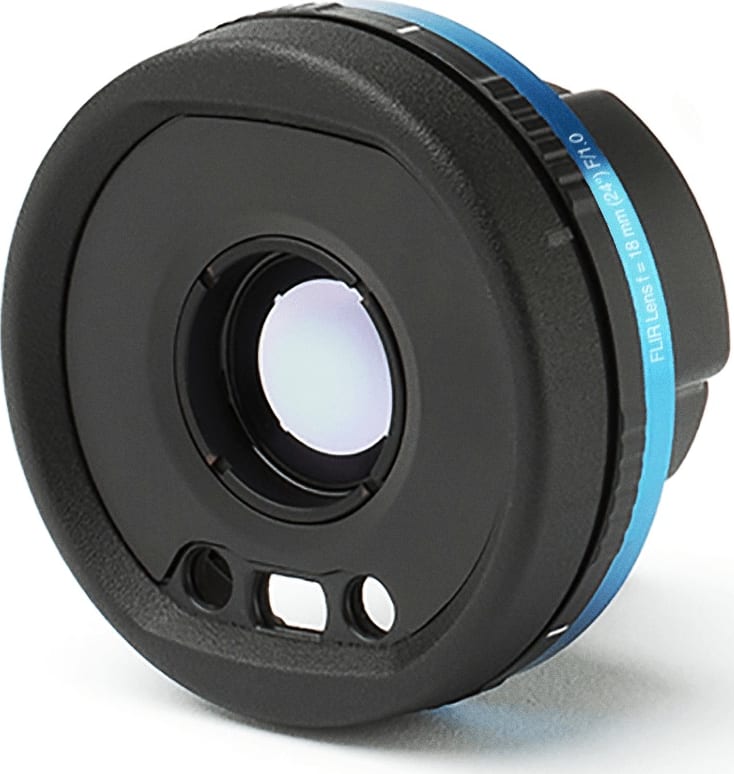
Flir T300443 – IR Lens for A700 Cameras, F = 18mm (24°), F/1.0
18.01.2025
FLIR T300437ACC – Lens Case
18.01.2025
FLIRT 300439 – Route Creator Inspection Workflow Software Plug-in – 12 Month Subscription
Route Creator Inspection Workflow Software Plug-in – 12 Month Subscription
Description
FLIRT 300439 – Route Creator Inspection Workflow Software Plug-in – 12 Month Subscription
The FLIR Route Creator Plugin for FLIR Thermal Studio Pro allows you to create and export inspection routes. Download these routes to FLIR T-Series cameras running the optional FLIR Inspection Route, and you have a powerful tool for streamlining inspections of multiple assets across a large site or across several locations. The route guides the inspector along with planned inspection points, where images and data are collected in a structured manner. Once the inspection is complete, results can be imported back to FLIR Thermal Studio Pro for analysis and reporting. The FLIR Route Creator Plugin is available as a 12-month subscription.
Efficiently Prepare And Manage Your Inspection Asset List
Define your routes based on assets and inspection sites, then export to a FLIR T-Series camera and E-Series cameras running FLIR Inspection Route.
Improve Your Inspection Flow
Stay on track with a step-by-step guide that links images to inspection assets.
Reduce Reporting Time
Automate data management, analyze it in a logical sequence, and generate reports in only a few clicks.
Prepare for Inspections
Simplify surveys by pre-planning the route using the FLIR Route Creator plugin for FLIR Thermal Studio Pro. This software plugin allows you to create lists of the assets you need to inspect at each location, organized in the most efficient order. Then, export the route in digital format and upload it to a FLIR thermal camera running Inspection Route mode. You can also export the file in a readable file format and print it as an inspection check list.
Keep Track of Assets During Inspections
With your route prepared, you begin a more efficient site inspection. By following the guided inspection points, you will reduce the chance of missing any assets—leading to unexpected faults and breakdowns. The Inspection Route option for your camera can guide you, step-by-step, through the survey while also auto-matching images, notes, and comments to the correct asset on your inspection list.
Streamline Reporting After Your Inspection
Thanks to the pre-planned route and the built-in organization features of FLIR Inspection Route camera software, post-inspection reporting will be a snap. You will easily match the faulty thermal and visual images with your asset list, add comments, status reports, and repair recommendations to images, and create your final report by using Thermal Studio Pro in smart and efficient way. You can build up a file of measurements for each asset over time so you can compare historical data and catch impending issues before they cause serious faults.
Похожие товары
-
2732486 (ЦИФРОВОЙ УСТРОЙСТВО ДЛЯ ВВОДА И ВЫВОДА)
60582,55 ₽Приобрести 2732486 от 1 штуки в Москве. Производитель PHOENIX CONTACT.
В наличии 98 шт. на складе. -
86DUINO ZERO Набор соединительных проводов
Краткое описание: Номер детали 114990008, производитель См. Описание 86DUINO ZERO CABLE KIT. Статус: без свинца, соответствует RoHS. В наличии 5993 шт. Технический паспорт: серия — другие названия 820071001, 820071001-ND. Уровень чувствительности к влаге (MSL) — 1 (неограниченно).
-
Уплотнитель для патрона лампы PT 359030106
11,38 ₽Приобрести 359030106 можно от 1 штуки в Москве. Производитель – AFFINITY MEDICAL TECHNOLOGIES, подразделение A MOLEX COMPANY.
На складе доступно 810116 шт.